

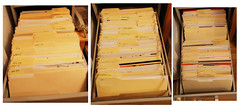
Manilla files never stand a chance agains the might and power of hanging files. Hanging files have super functional metal hangers that rip manilla files to shreds.
Sure Manilla files are beautiful in their simplicity. But they are all form with no function. Stick a bunch of manilla folders in a file cabinet and they end up mashing up against each other. Blah! (see photo above)
Hanging files give a nice separation between each file; therefore hanging files whens the steel cage cabinet match.
Right now I’m switching over from manilla folders to hanging files, you can see the progress on my 43things account at: http://www.43things.com/things/view/1363482?new_entry=1777391.
interesting. . . after summers temping in office. i learned from the “old school” professional secretaries. that “the correct and proper” way to complete filing is with both manilla and hanging file folders. a manilla file folder holds the contents and then it is placed in a hanging file folder. sometimes more than one manilla folder can be in a hanging file folder depending on the contact. the purpose. . . at least what i can ascertain from beyond just the voice of these experienced ladies “that’s the way it’s supposed to be”. was that if the boss-man wanted to look over a particular file, you could bring him the manilla folder. the hanging file folder would hold it’s spot and remind you 1) to make sure and get the file back before he loses it and 2)allow to ease when having to re-file. hanging file folder are a drag when taken completely out. the manilla keeps the contents safe and easily reviewable. yet the hanging file folders do allow one to easily breeze through files to find the topic or content needed.
hmmm, maybe i’ll just put the manilla folder inside the hanging file. The only thing I don’t like is that the tab on the manilla folder ends up covering the tab on the hanging file.
not really, you can put the little tabs for the hanging file folders anywhere along the folder. that way you can group all your hanging file folders tags on let’s say the left and then all the manilla folder taps on the right. or even in the middle (if there not cut that way, you can always fold them inside out to change the direction) if they’re both standard size, and hanging without being overstuff you should be able to see both. p.s. please excuse the many grammatical mistakes in the previous post. my mind was working faster than my fingers could type. 🙂
throw away your manilla folders. throw away your hanging folders. I have a better storage solution. I cut out 8.5×11 sheets of masonite board. Then I gator clip my papers to the board. Two gator clips on the left side. This way, I can easily flip through the papers and take out any paper that I wish. The gator clips are labeled with a white opaque pen. The papers are stored on my shelf where I can easily see what papers are what. Binders take up too much space. Manilla folders and hanging folders are too easily forgotten. My gator clip/board solution is easy and convenient.
i have around 300 files. So that mean, i would have to store 300 gator boards on a shelf. In many cases the gator board would be thicker than the sheet itself. Your gatorboard system is nice (I’ve seen it) when you use it for thick reference material. Actually you should blog your system sometime.
I have hanging folders and am wanting to switch to manilla folders inside of handing folders. But when I did, the manilla tab was mostly hidden by the hanging file (even without a tab on the hanging file). Do I have the wrong brand?
Sarah, I had the opposite problem. I wanted to prevent the tabs on the hanging folders from being covered by the file folders that were inside, then I discovered that they make interior file folders, which are shorter than standard file folders. If you’re using the interior ones, get the regular ones and they’ll be higher. But I think you just need to label your hanging folders better so you’ll know which one contains the folder you want. Then open that hanging folder to look at the inner labels.
This has been very helpful. Someone gave me a box of hanging files. I asked myself what might their purpose be? thank you for answers. 🙂
Interesting discussion. It might be interesting to see what David Allen says about Manila files and Hanging folders. (See the book: Get Things Done) He also shows them in the next video: http://www.youtube.com/watch?v=N9ULWQ_tnM8 It’s a pity that’s impossible to find Manila Folders in Europe. Guess I’ll ‘ve to import them straight from the US! Greetings to all, Jeff
Jeff, yeah, i know David Allen doesn’t like hanging files. He doesn’t say that in the video, but I recall in his book saying that the metal hooks get caught on things. He manilla files look nice in the video. But as someone who tried using them as my complete system, I found they didn’t work for me. I’m glad I made this blog post, because now I remember how much the files would get mashed up against each other. Thanks for commenting and posting the video. It was interesting to see David Allen talk. I never heard him speak before. I found it strange that he didn’t mention a to do list. He’s big on that in his book. But instead he does the very thing he recommends against and that’s to have random items (like his battery) in the file folder. I thought he said that everything should be written down into one system.