


Do you have a friend or loved one who adores libraries? For their upcoming birthday, consider creating a unique and thoughtful gift by wrapping their present in custom-made wrapping paper featuring a design inspired by the date stamps found in vintage library books.
The concept
The idea is to create a wrapping paper design that showcases all the years the birthday person has been alive, from their birth year to the current year. This design celebrates the individual’s life journey and makes for a truly personalized birthday gift.
The process
Initial attempt with Adobe Illustrator
I began by attempting to create the effect in Adobe Illustrator, starting with a single year. Using a Scatter Brush, I was able to achieve a nice, random distribution of the year. However, I quickly realized that creating the desired effect for all the years from 1979 to 2024 would require making 45 individual scatter brushes, which seemed too time-consuming.
Leveraging the power of Chat GPT
To simplify the process, I turned to Chat GPT, an AI language model, for assistance. I asked Chat GPT to write a JavaScript code that would scatter the years randomly on a canvas. To my delight, it provided the code almost instantly.
Refining the design
I ran the JavaScript file in my browser, and the initial result looked promising.
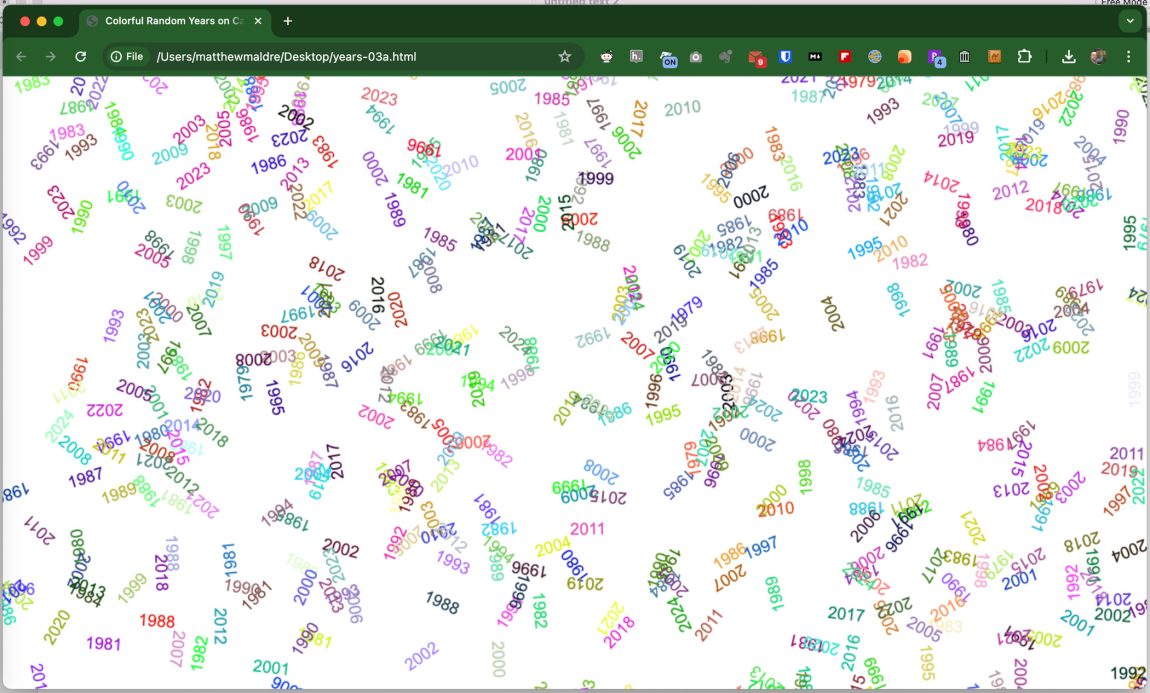
However, I wanted the wrapping paper to be more cluttered with years. To achieve this, I simply increased the frequency by changing a value in the code from 10 to 30.

MORE YEARS! The texture looked great with the increased number of years. I took a screenshot of my browser and printed it on my inkjet printer. Boom. Instant custom wrapping paper.

If you are curious, here’s what the setting looks like at 200:

Yeah, it’s too much.
Wrapping the gifts
To wrap larger presents, I printed multiple sheets and taped them together. You can see some of the seams. But you know what? The recipient isn’t complaining. They are glad to get totally custom wrapping paper.
Don’t stop at just one gift! Wrap all of the birthday person’s presents, including the envelope, in the same wrapping paper for a beautifully coordinated look.

The JavaScript code
If you’d like to create your own custom birthday wrapping paper, here’s the JavaScript code. Simply copy it into a text document, save it as “years.html”, and open it in your browser:
<!DOCTYPE html>
<html lang="en">
<head>
<meta charset="UTF-8">
<title>Colorful Random Years on Canvas</title>
<style>
  body { display: flex; justify-content: center; align-items: center; height: 100vh; margin: 0; }
  canvas { border: 1px solid black; }
</style>
</head>
<body>
<canvas id="canvas"></canvas>
<script>
  const canvas = document.getElementById('canvas');
  const ctx = canvas.getContext('2d');
  // Set canvas size
  canvas.width = window.innerWidth;
  canvas.height = window.innerHeight;
  // Function to generate random color
  function getRandomColor() {
    const letters = '0123456789ABCDEF';
    let color = '#';
    for (let i = 0; i < 6; i++) {
      color += letters[Math.floor(Math.random() * 16)];
    }
    return color;
  }
  function drawRandomYear(year) {
    // Choose a random position on the canvas
    const x = Math.random() * canvas.width;
    const y = Math.random() * canvas.height;
    // Choose a random rotation between 0 and 360 degrees
    const angle = Math.random() * 360;
    // Set the font and alignment
    ctx.font = '20px Arial'; // Slightly smaller font to fit more repetitions
    ctx.textAlign = 'center';
    ctx.textBaseline = 'middle';
    // Set a random color for each year instance
    ctx.fillStyle = getRandomColor();
    // Save the current context state (important for restoring after rotation)
    ctx.save();
    // Translate and rotate context
    ctx.translate(x, y);
    ctx.rotate(angle * Math.PI / 180);
    // Draw the year
    ctx.fillText(year.toString(), 0, 0);
    // Restore the original state
    ctx.restore();
  }
  // Draw multiple instances of each year from 1979 to 2024
  function fillCanvas() {
    for (let year = 1979; year <= 2024; year++) {
      for (let i = 0; i < 30; i++) { // Draw each year 30 times
        drawRandomYear(year);
      }
    }
  }
  // Initial fill
  fillCanvas();
</script>
</body>
</html>
You can customize the years by altering this line:
for (let year = 1979; year <= 2024; year++) {You can also find the full code on my CodePen. Please note that the text may appear more cluttered on CodePen due to the smaller canvas size compared to a full browser window.
Conclusion
Creating custom birthday wrapping paper with a vintage library date stamp inspired design is a thoughtful and unique way to celebrate someone’s special day. By using this Javascript, you can easily create a personalized gift that the birthday person will cherish.